
For Multi-unit operator · Child care
How to Prepare for Unannounced Daycare Inspections in California
Nearly all California daycare inspections are unannounced. Here's how to stay ready every day: quick-check systems, file organization, and what LPAs look for first.
The inspector walks in at 10:15am on a Tuesday. You've got three staff out sick, lunch prep happening in the kitchen, and a parent pickup in progress.
That's not a worst-case scenario. That's a Tuesday.
Nearly all California childcare inspections are unannounced. You don't get 24 hours to organize files, clean up the playground, or run through a checklist. You get the moment between "Good morning, I'm with Community Care Licensing" and "Can I see your staff files?"
The facilities that pass unannounced inspections aren't the ones that prepare when they hear a knock. They're the ones that stay ready.
Here's how to build "always inspection-ready" into your daily operations. (New to California inspections? Start with our complete inspection timeline for the full 7-phase process.)
When Do LPAs Actually Show Up?
Our analysis of 125,000+ visit records reveals when Licensing Program Analysts (LPAs) typically arrive:
| Time Window | % of Visits |
|---|---|
| 9-11 AM | 35.2% (peak window) |
| 11 AM-1 PM | 24.2% |
| 1-3 PM | 21.9% |
| 7-9 AM | 14.8% |
| 3 PM+ | 3.8% |
Translation: Your highest-risk window is mid-morning. More than a third of all visits start between 9 and 11 AM. The average visit lasts 2.5 hours (median 2 hours 15 minutes). So a 10 AM arrival means the LPA is there through lunch.
Why Preparation Isn't About the Day Of
The most common mistake directors make: treating inspection preparation as an event.
"I should organize my files." "I need to update that spreadsheet." "We should do an emergency drill."
These thoughts hit when someone mentions inspections. Then daily operations take over, nothing gets done, and the cycle repeats.
The shift: Stop preparing for inspections. Start maintaining inspection readiness.
The difference is systems versus events. An event requires you to remember, find time, and execute. A system runs automatically.
Facilities that pass unannounced inspections have systems. Here's how to build them.
System 1: The 60-Second File Pull
When inspectors arrive, their first request is almost always documentation. Staff files. Child enrollment records. Emergency procedures.
The test: Can you produce any requested document in under 60 seconds?
If the answer is "probably" or "depends on which one," your filing system needs work.
How to Organize for Speed
Staff files: Alphabetical by last name, each in its own folder
- Tab 1: Background checks (clearance letters, LiveScan receipts)
- Tab 2: Training certificates (CPR, First Aid, Health & Safety, Mandated Reporter)
- Tab 3: Health documentation (TB test, immunizations)
- Tab 4: Employment documents (job description, signed policies)
Child files: Alphabetical by last name, color-coded by classroom
- Emergency contacts (minimum 3, current phone numbers)
- Medical information and authorizations
- Immunization records
- Enrollment forms
Emergency procedures: One binder, clearly labeled, in main area
- Fire evacuation (room-specific routes)
- Earthquake response
- Medical emergency
- Lockdown procedures
- Emergency contact numbers
The 60-Second Drill: Once a week, have someone call out a random document request. Time yourself. "Sarah Johnson's CPR card." "Tommy's emergency contacts." "The fire drill log."
If you can't produce it in 60 seconds, fix the filing system.
Digital Backup
Paper files in cabinets work until:
- The cabinet is in the back and you're at the front with the inspector
- Someone misfiled something
- A file got taken out and not returned
Digital backup system:
- Take photos of every document when you file it
- Organize in cloud storage (Google Drive, Dropbox) with same folder structure
- Keep tablet or laptop accessible for quick pulls
When the inspector asks for Sarah's CPR card, you can show them the physical copy AND pull it up on screen in seconds.
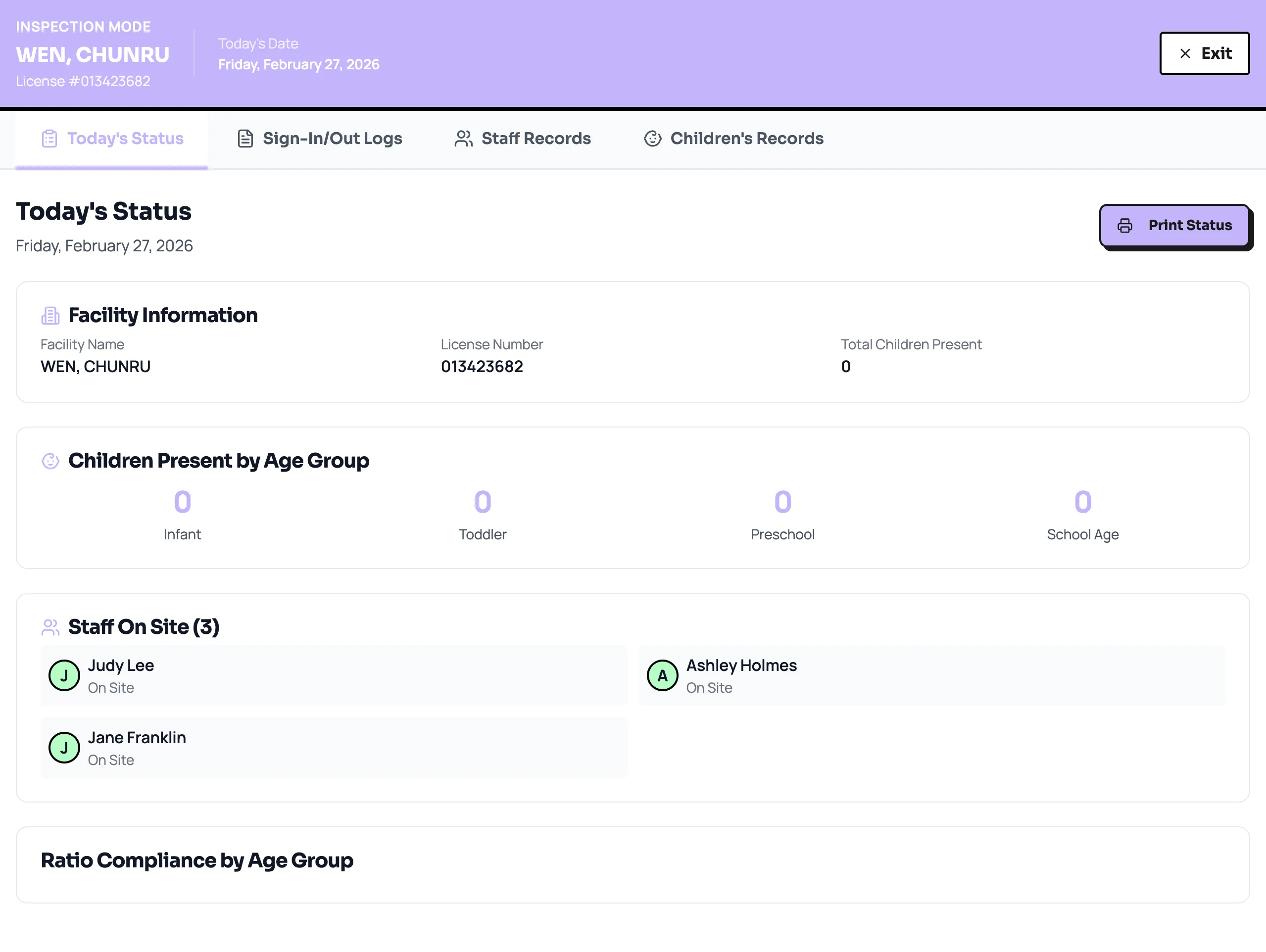
What ReadyRule does here: Inspector Mode pulls every staff record, attendance log, and certification into one clean screen you can hand to your LPA. Four tabs: today's status, sign-in logs, staff records, children's records. No filing cabinet needed. See how it works →
System 2: The Daily Quick-Check
15 minutes every morning. Not when you "have time." Every morning.
Morning Quick-Check Routine (15 minutes)
Documentation (5 minutes):
- Is anything expiring in the next 30 days? (Check your tracking system)
- Were any documents updated yesterday that need filing?
- Is the daily attendance sheet ready?
Facility (5 minutes):
- Temperature check: Is every room comfortable?
- Hazardous materials: Are cleaning supplies locked away?
- Emergency exits: Are paths clear?
- Required postings: Is everything still on the wall?
Staffing (5 minutes):
- Who's here today? Does ratio compliance work?
- Are any staff scheduled who have pending documentation?
- Is someone assigned to each required post?
Why daily matters:
Inspectors cite what they see at the moment of inspection. A cleaning supply left out "just for a minute" during morning prep is a citation if the inspector walks in during that minute.
Daily quick-checks catch the small gaps before they become citations.
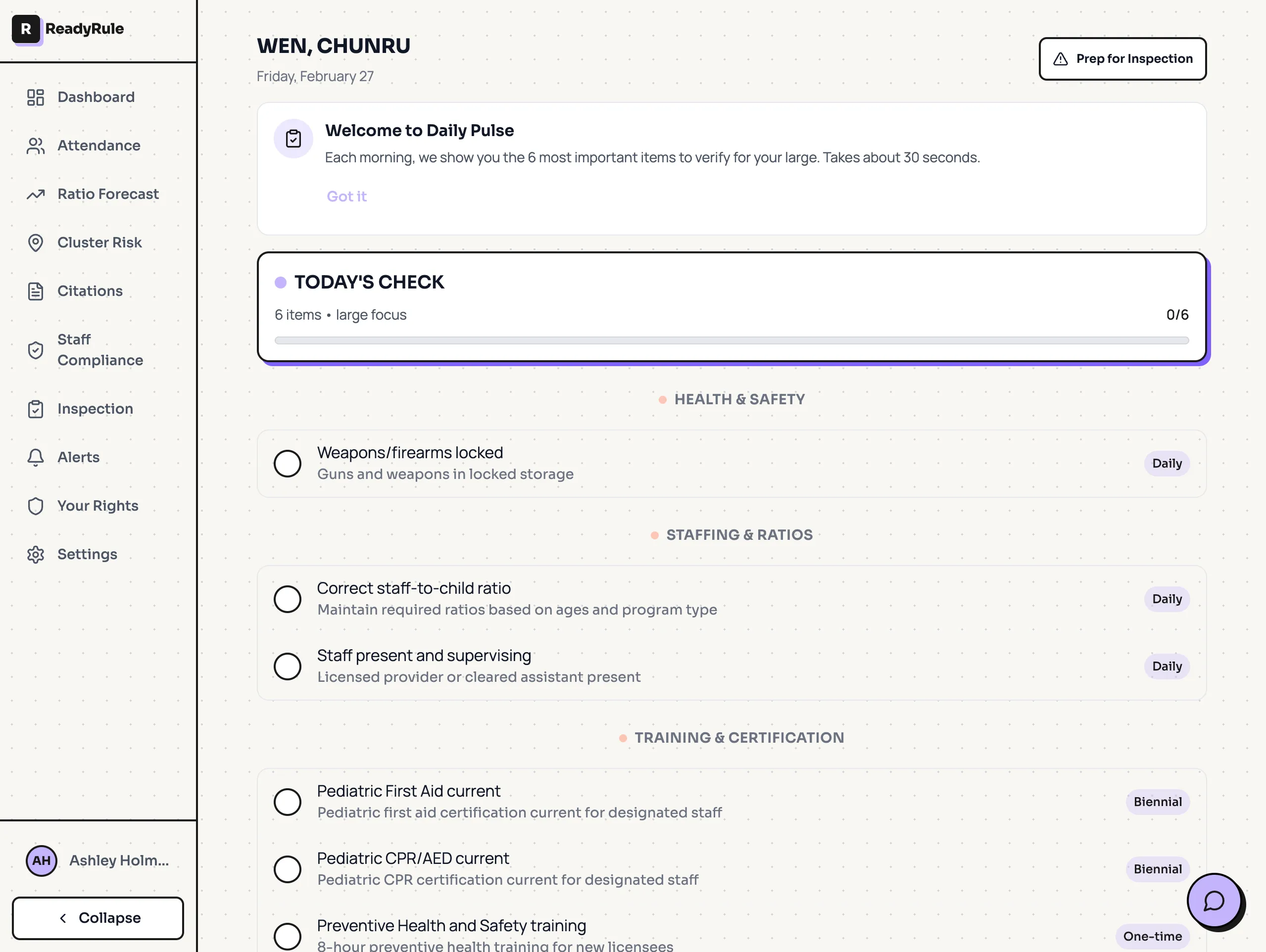
What ReadyRule does here: The Daily Pulse checklist personalizes this to your facility type, 4 to 6 items, 30-second review each morning. It switches to a full Prep Mode before inspections. See how it works →
Weekly Deep-Check (30 minutes)
Once per week, go deeper:
Staff files:
- Any certifications expiring in 60 days?
- All files complete for any new hires?
- Background check clearances current for everyone?
Child records:
- Any new enrollments missing documentation?
- Emergency contacts current (parents change numbers)?
- Immunization records up to date?
Facility:
- Playground equipment inspection (monthly log updated)
- Fire extinguisher tags current
- Smoke detector test documented
- Refrigerator/freezer temperature logs complete
System 3: The Instant Inspection Response
The inspector is at your door. What happens in the first 5 minutes sets the tone for the entire inspection.
The First 5 Minutes
Step 1: Acknowledge and welcome (30 seconds)
- "Good morning, welcome to [facility name]"
- "I'm [name], the director. Let me get you started."
- Calm, professional, not defensive
Step 2: Verify credentials (30 seconds)
- Ask to see official ID
- Note inspector name (you'll want this for your records)
- This is standard. Inspectors expect it.
Step 3: Designate your point person (1 minute)
- If you can't be the primary contact (you're covering a classroom), assign someone
- "Maria will help you with whatever you need. I'll check in as soon as I can."
- One point of contact prevents confusion
Step 4: Gather core documentation (2 minutes)
- Staff files
- Child enrollment binder
- Emergency procedures binder
- Daily attendance
- Most inspectors ask for these first
Step 5: Continue normal operations (ongoing)
- Don't panic-rearrange the classroom
- Don't pull staff off supervision to clean
- Normal operations demonstrate actual compliance
What NOT to Do
Don't:
- Apologize preemptively ("I know we need to update some things...")
- Explain before being asked ("We're in the middle of switching systems...")
- Hover anxiously (give the inspector space to work)
- Pull staff from supervision to help you find things
- Make excuses for what they haven't found yet
Do:
- Answer questions directly
- If you don't know, say "Let me find that for you"
- Take notes on what they ask for
- Ask clarifying questions if needed
What Inspectors Check First (And How to Prioritize)
Based on statewide inspection patterns, here's what gets checked most often in the first 30 minutes:
Priority 1: Staff Documentation
What they ask for:
- Complete staff files
- Current background check clearances
- Training certificates with visible expiration dates
- TB test documentation
Why it's first: Staff documentation is verifiable within seconds. Either the paperwork exists or it doesn't. Inspectors can cite documentation gaps immediately. (Background check gaps are the #1 citation type statewide at 17.1% of all facilities.)
Your prep: Every staff file should be complete and current before any inspection day. There's no scrambling for documents; they're either filed or they're not. See our 5 documents inspectors always ask for for the complete checklist.
Priority 2: Ratio Verification
What they do:
- Count children present in each area
- Count qualified staff supervising
- Calculate ratios by age group
Why it's checked early: Ratio violations are observable in real-time. If you're over ratio when they walk in, that's a citation; no explanation changes what they saw. (Ratio violations are also one of 4 citation types that trigger re-inspections.)
Your prep: Know your ratios by heart. Have a backup plan when staff call out. Never, ever exceed licensed capacity.
Priority 3: Posted Requirements
What they look for:
- Current facility license (visible from entrance)
- Most recent inspection report
- Parent rights poster
- Emergency procedures
- Capacity posting in each room
Why it matters: Posted requirements are instant verification. Walking through the building, the inspector notes what's there and what's missing.
Your prep: Designate one "compliance wall" near the entrance. Everything required posted, laminated, and checked weekly.
Priority 4: Physical Environment
What they check:
- Hazardous materials storage
- Water temperature at sinks
- Playground equipment condition
- Exit accessibility
- General cleanliness and safety
Why it's inspected: Physical environment issues are visible without asking for documentation. The inspector forms impressions while walking through.
Your prep: Daily quick-check covers the basics. Monthly facility audit catches deeper issues.
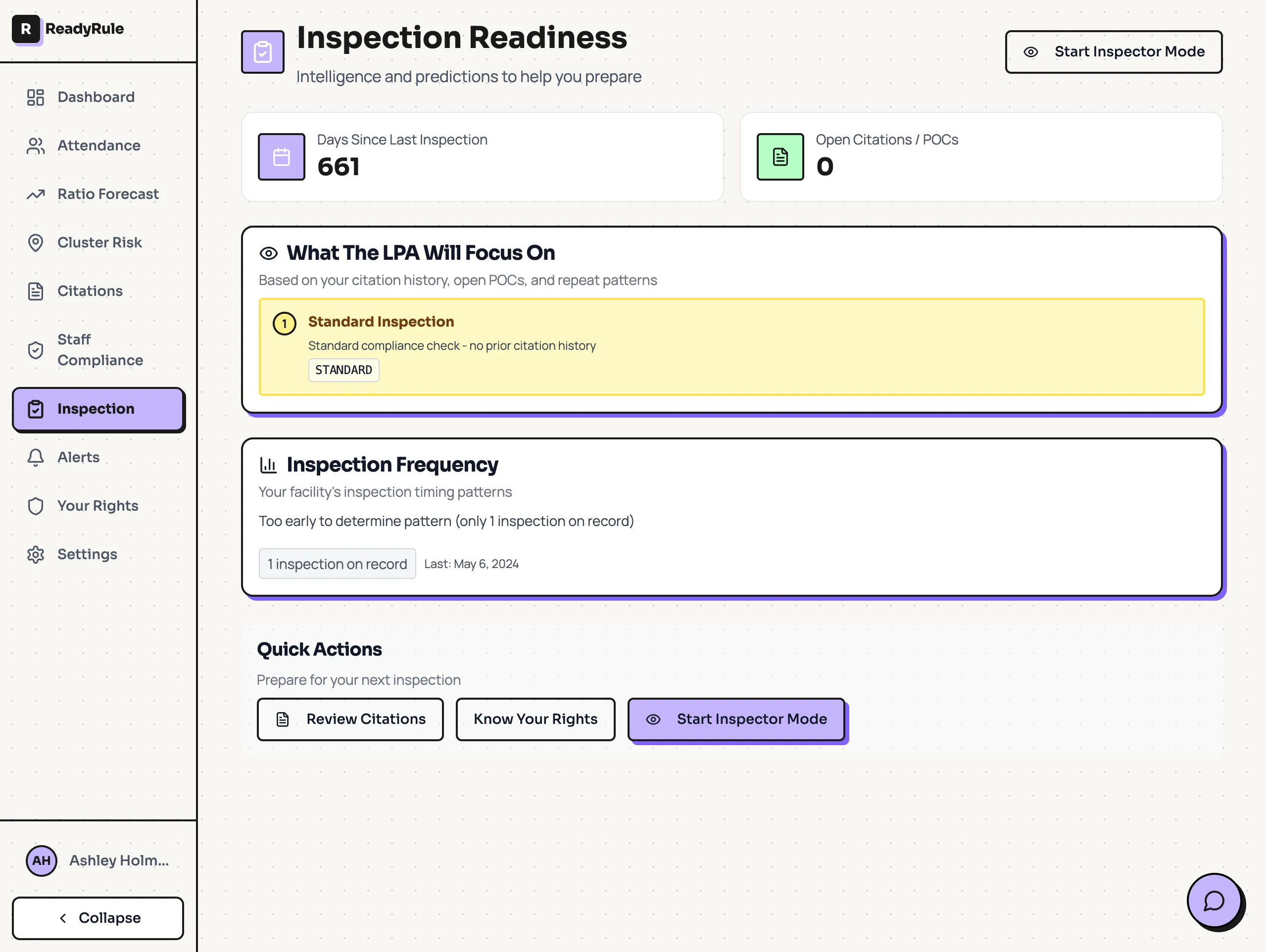
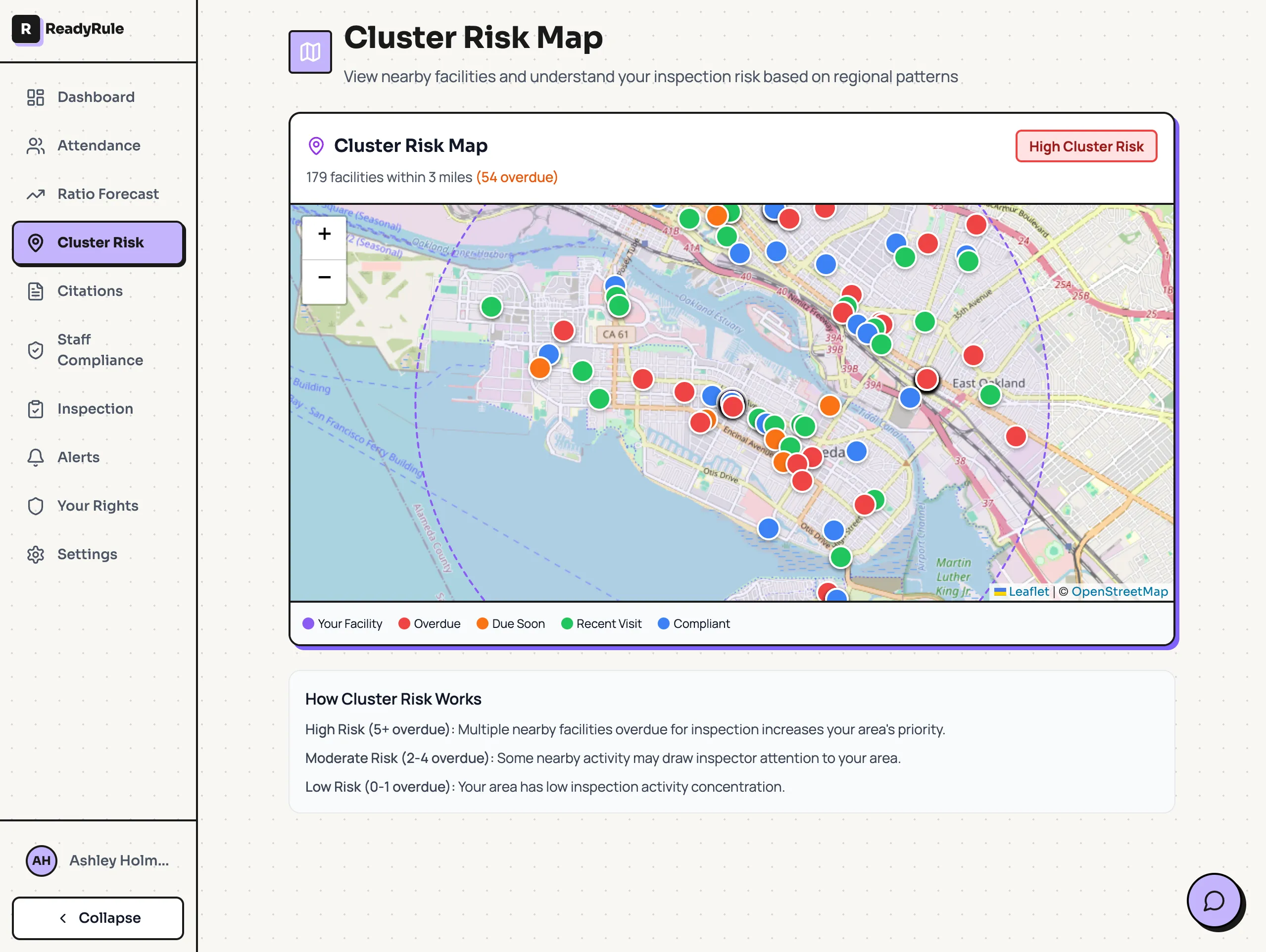
What ReadyRule does here: The Inspection Readiness dashboard shows what LPA is likely to focus on at your facility, based on your citation history, repeat violation risk windows, and regional enforcement patterns. The Cluster Risk Map shows what inspectors are citing at nearby facilities right now. See how it works →
Building Your Daily Readiness Habit
The hardest part of "always inspection-ready" isn't knowing what to do. It's doing it consistently.
The Habit Stack
Attach inspection readiness tasks to things you already do:
Morning arrival → Quick documentation check "When I unlock the door, I check expiration alerts before anything else."
First staff member clocks in → Ratio confirmation "When Maria arrives, I confirm we're covered for the day."
After lunch → Environment scan "When kids go down for nap, I walk the building."
End of day → File anything from today "Before I lock up, anything that needs filing gets filed."
The Weekly Anchor
Pick one day for your deep-check. Make it non-negotiable.
Good days: Monday morning (start week organized) or Friday afternoon (close week clean)
Bad days: Any day that's "when I have time" (you won't)
Put it on the calendar like a staff meeting. It has equal priority.
The Monthly Audit
Once per month, do a full mock inspection:
- Pretend you're the inspector: Walk through with fresh eyes
- Request your own documents: Can staff produce what you ask for?
- Check every system: Files, postings, environment, ratios
- Document findings: What needs improvement?
- Fix immediately: Don't add to a "later" list
The monthly audit catches drift. Systems that worked in January might have gaps by March.
When You Know an Inspection Is Coming
Some inspections are announced: initial licensing, plan of correction follow-ups, complaint investigations (sometimes).
When you know one is coming:
24-48 Hours Before
Documentation blitz:
- Pull every staff file, verify completeness
- Check every child enrollment record
- Update any outdated emergency contacts
- File anything that's been sitting on your desk
Facility walk-through:
- Fresh eyes on every room
- Check storage areas (cleaning supplies locked?)
- Test emergency equipment (flashlights work? First aid kit stocked?)
- Verify postings haven't fallen down or been covered
Staff briefing:
- Everyone knows an inspection is expected
- Remind of key procedures (ratio compliance, supervision standards)
- Designate primary inspector contact
Morning Of
- Final walk-through
- Documents easily accessible
- Normal operations (don't over-stage)
- Deep breath
The preparation you did in the weeks before matters more than the morning of.
The Real Secret to Unannounced Inspections
Facilities that consistently pass unannounced inspections share one thing: they stopped thinking about "passing inspections" entirely.
They think about running a compliant facility every day.
The inspection becomes a verification of what's already true, not a test you might fail.
When the inspector walks in at 10:15am on a Tuesday, you don't panic. You don't scramble. You think: "We're ready. We're always ready."
That's the goal.
Stay Ready With Less Effort
The systems in this guide work. But they require you to remember to check, track, and file every day.
ReadyRule handles the memory for you:
- Expiration alerts: 90, 60, 30, and 7 days before any certification expires
- Inspector Mode: every staff record and attendance log on one screen, ready for LPA
- Daily Pulse: personalized morning checklist based on your facility type
- Readiness Dashboard: what inspectors are focusing on in your area right now
Stop relying on your memory. Let the system remind you.
Check Your Facility's Compliance → | View Pricing
Are you a parent? See what questions to ask your daycare about their inspection readiness in our 10 Questions to Ask About Inspection Records →